

Electric Height-Adjustable Desk Frames: The Buyer's Guide

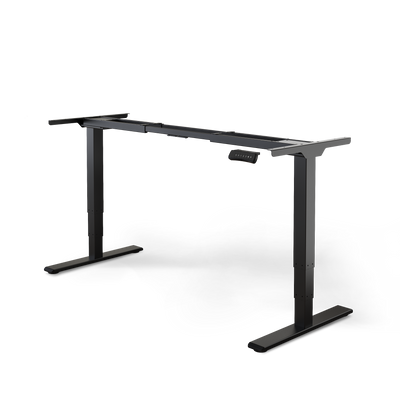
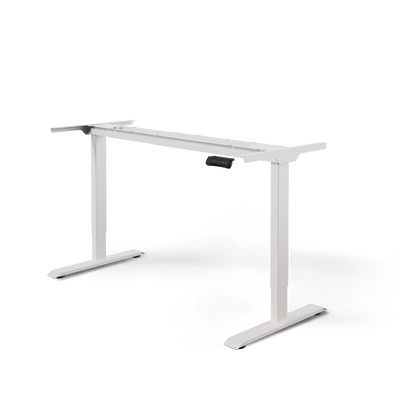
An electrically height-adjustable desk frame is the basis for a modern, ergonomic workstation. It is the technical foundation that allows you to transform almost any desktop into a fully functional sit-stand desk. Instead of adapting to a fixed desk height, you determine the optimal working height yourself at the touch of a button.
The Foundation for Dynamic Work
An electrically height-adjustable desk frame is more than just a metal frame. It is the foundation for a workstation that adapts to you, not the other way around. Unlike ready-made desks, a separate frame gives you the freedom to customize your setup.

The decisive advantage is the ability to easily switch between sitting and standing. Sitting for hours strains the spine, leads to tension in the neck, and can impair blood circulation. Switching to a standing position relieves the back, stimulates circulation, and promotes concentration.
Why a separate frame is often the better choice
Choosing a single frame instead of a complete desk offers clear advantages. You retain full control over the result and can assemble a workstation that perfectly matches your requirements.
The main reasons for a separate frame are:
- Individuality: You determine the look. Whether it's a solid oak top for a natural look, a special size for a niche, or a lightweight top for maximum flexibility. You have complete freedom of choice.
- Cost-effectiveness: The combination of a high-quality frame and a separately purchased top is often more affordable than a comparable complete desk. You invest specifically in the technology for stability and durability.
- Sustainability: Do you already have a good tabletop? Perfect. You can simply continue to use it. This saves money and resources.
The core benefit summarized
The main purpose of an electrically height-adjustable desk frame is to bring more movement into your workday. The simple operation at the touch of a button facilitates regular position changes.
A dynamic workplace is active health prevention. The regular change between sitting and standing prevents postural damage caused by rigid sitting.
In addition to ergonomics, these systems also offer practical advantages. They make a workstation usable for several people of different heights. This contributes to an inclusive working environment and brings the concept of accessibility into focus.
Whether in the home office, a startup office, or a co-working space. This adaptability creates optimal conditions for everyone. This makes such a frame a future-proof investment in your health and productivity.
Understanding the Technology Behind the Desk Frame
An electrically height-adjustable desk frame is a precise system of motors, mechanics, and control electronics. These components must work together reliably for years. A technical data sheet can initially seem overwhelming. Those who know what to look for will quickly recognize the important features.

These components determine the performance, noise level, and longevity of your workstation. Understanding their interaction helps you make an informed purchasing decision that suits your needs.
The Heart of the Drive: Motors and Lifting System
The motor is the most important component. It determines how fast, quiet, and powerful your desk moves. A fundamental distinction is made between systems with one motor and those with two motors.
In single-motor systems, a central motor drives both desk legs via a shaft. They are often cheaper, but usually slower and louder in operation.
Dual-motor systems have a separate motor in each desk leg. This offers several advantages. Height adjustment is noticeably faster and quieter. The load capacity is significantly higher. Thanks to synchronized control, both legs move evenly and without jerking. For most professional setups, a dual-motor system is the better choice.
The decisive difference: A dual-motor drive distributes the load evenly on both sides. This reduces wear and tear and ensures greater stability. This is particularly important if you use a heavy desktop or a lot of equipment.
Important Performance Characteristics in Comparison
The choice of the right drive depends on your individual needs. The following table helps you compare common systems and make the right decision.
Comparison of Drive Types for Desk Frames
This table shows the differences between desk frames with one, two, or three motors in terms of performance, stability, and suitability.
| Feature | Single-Motor Frame | Dual-Motor Frame | Triple-Motor Frame (for corner desks) |
|---|---|---|---|
| Load Capacity | Typically up to 80 kg | Often between 120 kg and 160 kg | Up to 200 kg or more |
| Lifting Speed | Slower (approx. 25 mm/s) | Faster (approx. 38-40 mm/s) | Very fast and powerful (approx. 40 mm/s) |
| Noise Level | Mostly over 50 dB | Quieter (often below 45 dB) | Very quiet (often below 45 dB) |
| Stability | Sufficient for simple setups | Very high, even with heavy loads | Maximum stability for large setups |
| Suitability | Lightweight desktops, laptop workstations | Professional setups, multiple monitors | Large corner desks, heavy equipment |
Dual-motor frames are the best choice for most applications and offer an excellent balance of performance, stability, and durability.
Properly Assessing Load Capacity and Stability
The stated load capacity always refers to the dynamic load. This is the weight that the frame can lift during movement. Add up the weight of your desktop, computer, monitors, and other equipment. Plan for a buffer of at least 20%. This ensures that the motors are not constantly operating at their load limit.
Stability is equally important, especially at maximum desk height. A high-quality electrically height-adjustable desk frame can be recognized by a solid steel construction and overlapping segments in the lifting columns that prevent wobbling. Look for certifications such as from TÜV, which guarantee tested stability. Detailed comparisons can also be found in our electrically height-adjustable desk test.
Intelligent Control and Safety Features
Modern desk frames can do more than just move up and down. A well-designed control element is crucial for comfortable everyday use.
- Memory function: Save your ideal sitting and standing heights. A single button press is all it takes to reach the perfect position.
- Display: Shows the current height precisely in centimeters so you can find your ergonomic setting again.
- Anti-collision protection: A gyro sensor detects obstacles such as a chair or rolling cabinet. The movement stops immediately and retracts a bit to prevent damage.
These features make daily use easier and safer. They protect your furniture and the desk's technology.
The history of modern sit-stand desks is closely linked to European innovations. The first system with electric lifting columns came onto the market in 1998, changing workplace ergonomics. Today's models are even more advanced. Modern technology has reduced standby power consumption from 1-2 watts then to 0.1 watts now. This complies with strict EU energy efficiency directives.
Finding the Right Tabletop for Your Frame
A high-quality electrically height-adjustable desk frame is the foundation. Only the tabletop completes your workstation. It determines the look, feel, and longevity of your setup.
Choosing the top is a personal decision. It's the surface you touch and use every day. Take as much time choosing it as you do the frame itself.

Comparing Materials: What Suits You?
The market offers a wide selection of materials. Each option has its own advantages and disadvantages. Ultimately, it's a trade-off between aesthetics, functionality, and budget.
Here are the most common materials at a glance:
-
Solid Wood: A classic for natural warmth and unique aesthetics. Each panel is unique due to its individual grain. Solid wood is durable and can be sanded and re-oiled if scratched. However, it is heavy and requires maintenance.
-
MDF (Medium-Density Fiberboard): A versatile and affordable solution. MDF panels usually have a robust coating of melamine resin or a veneer. This makes them easy to clean and scratch-resistant. They are available in many colors and decors with a smooth surface.
-
Composite Materials: These include, for example, laminate panels (HPL) or coated chipboard. Their advantage is high resistance to abrasion and moisture. This makes them ideal for heavily used workstations.
-
Bamboo: A sustainable and visually appealing alternative to wood. Bamboo is harder than many domestic wood types, yet light and dimensionally stable.
Each material has its own weight. You must deduct this weight from the maximum load capacity of your frame. A heavy oak top demands more from the motors than a light MDF top.
Determining the Right Size and Thickness
The perfect panel size depends on the available space and the dimensions of your desk frame. Carefully measure your space and allow enough room for movement.
Most frames are flexible in width and provide a range for the panel size, for example, from 120 cm to 200 cm wide. For depth, 70 cm to 90 cm has become established, with 80 cm being considered the ergonomic standard.
The thickness of the panel is also important for stability. A thickness between 2.5 cm and 4 cm is ideal. A panel that is too thin can sag under load. A panel that is too thick unnecessarily increases the overall weight.
Attaching the Tabletop: Creating a Stable Connection
Mounting the top is the final crucial step. Careful work here is important for the stability of the entire desk.
For a secure mounting, you should consider these points:
- Center: Place the tabletop upside down on a soft surface. Place the frame upside down on top of it and align it centrally. Measure the distances to all edges.
- Pre-drill: Mark the screw holes of the frame on the top. Pre-drill the holes with a drill bit that is slightly thinner than the screws. This prevents the wood from splitting.
- Screw length: Check the length of the screws. They must not protrude from the other side of the tabletop. As a rule of thumb: the screw should sit about two-thirds of the panel thickness deep in the material.
A correctly mounted tabletop is crucial for maximum stability. If you want to learn more about materials, read our guide on choosing the right solid wood desk top.
Assembling Your Desk Frame Step-by-Step
Assembling an electrically height-adjustable desk frame yourself is easier than you think. With preparation and good instructions, the assembly will be successful. You don't need any special knowledge, just patience and the right tools.
This guide will walk you through the process. We'll start with preparing your workspace and go through everything step-by-step, including cable management. This way, your new desk will be stable, functional, and visually appealing.

Preparation is Key
Make sure everything you need is ready before you start. Good organization will save you time searching later and prevent mistakes.
Spread all components neatly on the floor. A check against the parts list in the instructions will immediately show if everything is complete.
You only need standard tools for assembly. Gather the following:
- Cordless drill: Speeds up tightening screws. A torque attachment prevents overtightening.
- Measuring tape: Essential for centering the tabletop.
- Spirit level: Ensures your desk stands straight.
- Pencil: For marking drill holes.
A practical tip: Work on a soft surface like a carpet. This protects the floor and components from scratches.
Assembly of the Frame
First, you assemble the base frame. This is the centerpiece that supports the tabletop and connects the lifting columns. Screw the crossbeams to the side panels.
Most frames are flexible in width. Set the appropriate width for your tabletop now. Initially, only hand-tighten the screws to allow for adjustments.
Then, mount the lifting columns (desk legs) to the brackets. Make sure they are firmly seated. Finally, attach the desk feet to the lifting columns. Only now tighten all screws on the frame.
Connecting Frame and Tabletop
This step determines the stability of your desk. Place your tabletop upside down on a soft surface. Carefully lift the assembled frame onto it and place it upside down as well.
Precise alignment is crucial for stability and appearance. Carefully measure the distances of the frame to all four edges of the tabletop with the measuring tape. Only if these distances are identical will the frame be perfectly positioned.
Once everything is positioned, mark the drill holes with the pencil. Briefly lift the frame off. Pre-drill the holes at the markings, but do not drill completely through the top.
Place the frame back on the top and screw it firmly. Pre-drilling ensures optimal screw grip.
Electrical Components and Cable Management
The last step is wiring. Connect the motors to the control box. The plugs are designed so that they cannot be inserted incorrectly. Screw the control box and the control panel to the underside of the tabletop.
Clean cable management ensures a good appearance and greater safety. Use the included cable clips or self-adhesive cable guides.
Proceed as follows:
- Bundle cables: Gather all cables to the control box into one strand.
- Route: Guide the cable strand along the crossbar to the socket.
- Secure: Fasten the cables with cable ties or clips under the top so that nothing hangs down.
Get a second person to carefully turn the desk over. Plug the power cord into the outlet, perform the initial calibration according to the instructions. Your new sit-stand workstation is ready for use.
Care, Warranty, and What You Can Do for a Long Desk Life
An electrically height-adjustable desk frame is an investment in your health. With a little care and a clear understanding of the warranty conditions, you'll enjoy it for a long time.
Regular maintenance prevents wear and tear and ensures the function of mechanics and electronics. Your desk frame is a precision tool for your daily work. A little attention will ensure full performance over the long term.
Simple Care Tips for Your Desk Frame
A simple routine every few months will keep your frame in good condition.
These three steps make all the difference:
- Clean surfaces: Wipe the painted metal parts with a slightly damp, soft cloth. Avoid aggressive cleaners or abrasive sponges.
- Check screws: Vibrations in daily use can loosen screws. Simply retighten them to ensure stability.
- Keep moving parts clear: Make sure the lifting columns are clean and free of obstacles. A clear mechanism ensures quiet height adjustment.
What Makes a Good Warranty
A warranty is a clear statement from the manufacturer about the quality of its product. A provider like Deskspace, who is confident in their technology, offers transparent and fair conditions.
A long warranty period, for example, five to ten years on the frame and electronics, is a strong sign. It shows that the manufacturer trusts its components. Make sure that both the motors and the control system are covered.
Service is equally important. Good support quickly helps with questions and finds an uncomplicated solution in an emergency, for example by sending spare parts without bureaucracy.
The investment in an electrically height-adjustable desk frame is also economically sensible. The costs due to illness-related absences at work are high. According to the Federal Institute for Occupational Safety and Health, an absence day in 2022 cost an average of 233 euros. With an average illness duration of 21.3 days, that's almost 5,000 euros per employee per year. An ergonomic desk frame costs a fraction of that. You can read more about the economic advantages in this analysis on workplace ergonomics.
Quick Help for Small Problems
Sometimes your desk's electronics need a restart, for example, after a power outage. You can easily do this yourself.
Drive the frame completely to the lowest position. Then hold down the "Down" button for a few seconds until the frame briefly jerks or emits a beep. This recalibrates the system, and it should function normally again.
How to Apply for Subsidies and Funding for Your Desk
An electrically height-adjustable desk frame is an investment in your health. You often don't have to bear these costs alone. In Germany, there are various ways to receive financial support for an ergonomic workplace.
These grants make the purchase more feasible. The most important contact points are the German Pension Insurance (DRV) and the statutory health insurance funds. Both have recognized that prevention in the workplace saves costs in the long term and protects the health of insured persons.
Under What Conditions is Funding Available?
The key to a grant is medical necessity. You need a doctor's certificate confirming that a height-adjustable desk is necessary. This is often the case with chronic back pain or after a herniated disc.
The application is a regulated process that is straightforward with the right documents.
- Medical certificate: An informal letter from your doctor certifying medical necessity.
- Cost estimate: A concrete offer for the desk frame and tabletop.
- Application forms: The official forms of the respective cost bearer.
For the German Pension Insurance, these are forms G0100 and G0130 for the "Application for Benefits for Participation in Working Life" (LTA). You can find more details in our guide on how to apply for health insurance subsidies for height-adjustable desks.
How High Are the Subsidies and How Does It Work?
The amount of funding is often considerable. The DRV, for example, covers costs of up to 800 euros for a desk as part of the LTA if one has paid contributions for at least 15 years. Since 2020, over 500,000 such applications have been approved in Germany. This is an increase of 150 percent.
Important: Always submit the application before you buy something. Reimbursement afterwards is almost always excluded.
For companies, too, there are possibilities within the framework of corporate health promotion (BGF) to subsidize the equipment of their employees. This strengthens team health and is often tax-beneficial.
Questions We Always Receive About Desk Frames
Finally, we'll answer common questions about choosing an electrically height-adjustable desk frame. We want to remove any lingering uncertainties and help you with your decision.
How high is the power consumption really?
The rumor that an electric desk frame is a power guzzler persists. The truth is: the consumption is minimal and barely noticeable on your electricity bill.
- In operation: The motors only draw power when you change the height, i.e., for a few seconds a day.
- In standby: Good models switch to an extremely energy-saving idle mode. Modern systems like those from Deskspace often consume less than 0.1 watts. This makes them more economical than EU directives require.
In plain terms: The annual electricity costs for a modern desk frame with normal use are a few euros.
Can I simply continue to use my old tabletop?
Yes, in most cases, this is easily possible. This is one of the biggest advantages of a separate frame. You save resources, save money, and keep the tabletop you like.
Make sure that the dimensions and thickness of your top fit. Check the frame's specifications for the minimum and maximum top width. Your top should be at least 2.5 cm thick so that the screws grip securely.
And what about stability when the table is at its highest?
Stability at maximum height distinguishes high-quality models from cheaper ones. Cheap models often start to wobble here.
High-quality frames are constructed differently. They rely on solid steel, precisely manufactured lifting segments, and a heavy, solid base. This combination minimizes lateral play and ensures that your desk remains stable even when standing. An indication of tested stability is certifications, for example from TÜV.
Ready to make your workspace ergonomic? Discover TÜV-certified desk frames from Deskspace and find the perfect basis for your healthy workday. Benefit from up to 10 years warranty and a 100-day test phase. Configure your desk frame now at deskspace.de.


